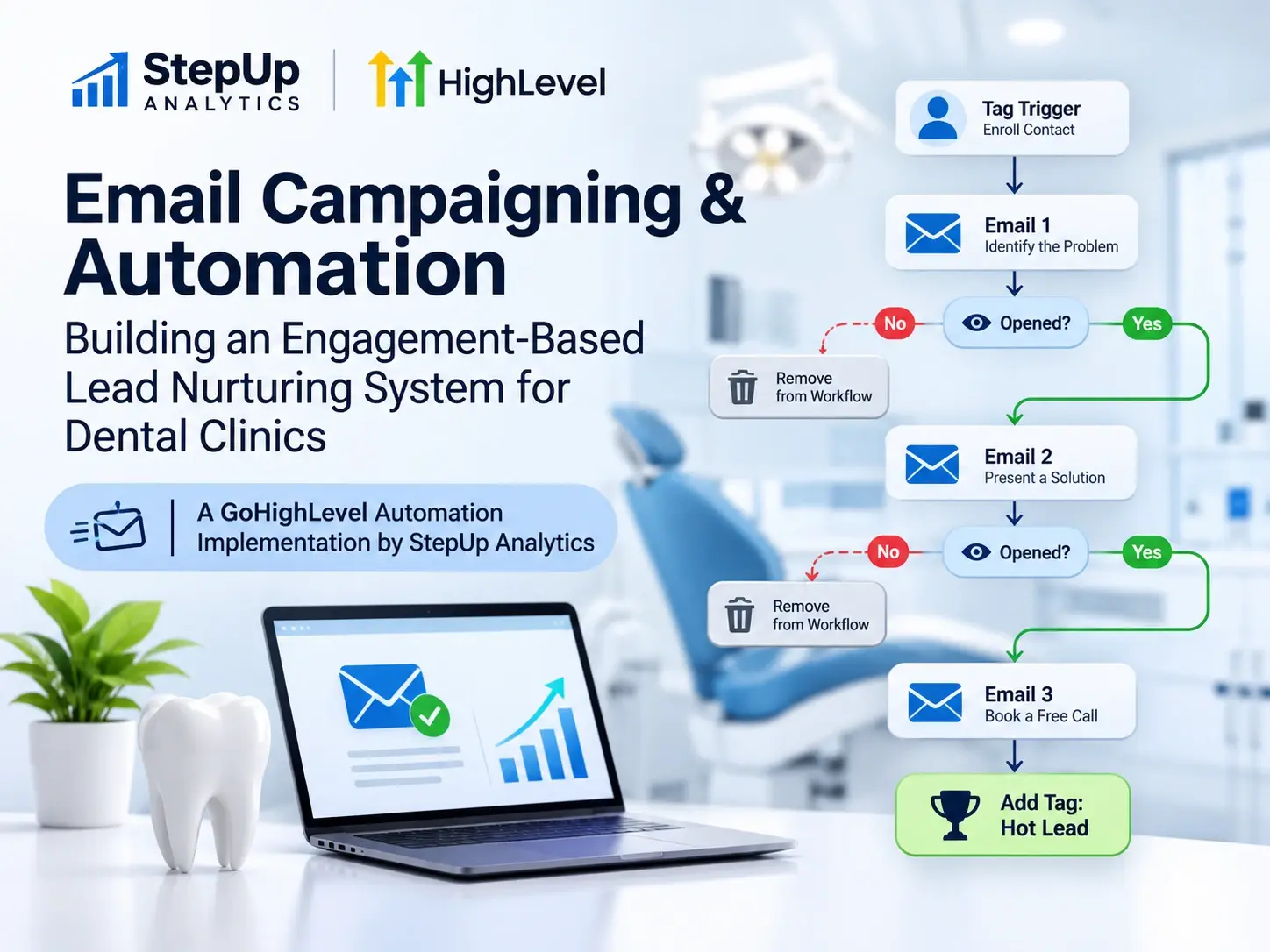
Email Campaigning & Automation: Building an Engagement-Based Lead Nurturing System for DentalClinics

A GoHighLevel Automation Implementation by StepUp Analytics
1. Project Overview
A good email campaign is not just about sending a series of emails. It is about understanding how recipients interact with those emails and using that information to decide what happens next.
For a dental clinic lead-generation campaign, we built an automated email nurturing workflow in GoHighLevel (GHL) that delivers up to three emails based on recipient engagement.
The purpose of the campaign is to introduce website-related improvement opportunities to dental clinic leads, encourage them to explore potential solutions, and identify contacts who consistently engage with the communication.
Rather than sending all three emails to every contact at fixed intervals, the workflow checks whether a recipient opens each of the first two emails. Contacts who open an email within the defined seven-day observation period move forward. Those who do not are tagged and automatically removed from the sequence.
We also added sending controls to manage campaign volume. These include a daily limit, weekday scheduling, and a per-minute delivery throttle. Together, these settings help distribute contacts through the workflow instead of releasing a large number of them simultaneously.
The result is a structured nurturing process where email delivery, engagement checks, and contact segmentation are handled automatically.
Key Implementation Details
- CRM and automation platform: GoHighLevel (GHL).
- Campaign type: Automated email nurturing.
- Target audience: Dental clinic leads.
- Email sequence: Three emails.
- Enrollment method: Contact tag trigger.
- Daily drip limit: 200 contacts per day.
- Sending schedule: Weekdays, beginning at 11:00 AM.
- Delivery throttle: One contact per minute.
- Engagement condition: Email opens within a seven-day observation period.
- Lead segmentation: Separate tags for contacts who do not open emails and contacts who complete the sequence.
- Final contact tag:
hot-lead.
2. The Objective: Moving Beyond One-Size-Fits-All Email Campaigns
A basic email campaign usually follows a predictable pattern: upload a contact list, schedule a few emails, and send them at predefined intervals.
That approach is easy to set up, but it does not account for how people actually behave.
Some recipients open the first email immediately. Others take a few days. Some never open it at all. Sending the same sequence to everyone, regardless of their activity, means treating an engaged prospect and an inactive contact in exactly the same way.
We wanted to make the campaign more responsive to recipient behavior.
The objective was to build a workflow that could manage four things without requiring someone to monitor every contact manually:
- Control email distribution: Use daily and per-minute drip settings to manage how many contacts progress through the campaign at once.
- Structure communication: Deliver three emails in a planned sequence with defined intervals between them.
- Respond to engagement: Allow contacts to continue only when they open the preceding email within the seven-day observation period.
- Segment contacts automatically: Apply dedicated tags to contacts who stop engaging and those who complete the sequence.
This changes the role of automation. Instead of simply scheduling emails, the workflow uses recipient activity to determine the next action.
3. Workflow Architecture: How the Automation Works
We built the entire campaign inside GoHighLevel's workflow automation system.
Contacts enter through a dedicated tag trigger. From there, they move through sending controls, email actions, waiting periods, and conditional transitions.
At a high level, the workflow follows this structure:
Contact Enrollment → Email 01 → Engagement Check → Email 02 → Engagement Check → Email 03 → Hot Lead Tag
The important part is what happens between the emails. After the first and second messages, the workflow checks whether the recipient opened the email within seven days. That decision determines whether the contact continues or exits the sequence.
3.1 Contact Enrollment Through Tag-Based Triggers
The workflow starts with the following trigger:
Contact Tag Added: trigger-email-dental-clinic
Whenever this tag is added to a contact, GoHighLevel enrolls that contact in the email nurturing workflow.
We used a dedicated tag because it makes campaign enrollment easier to manage. The tag can be applied manually or through another workflow or integration, giving us a simple way to control which contacts enter the campaign.
It also keeps enrollment separate from email delivery. The process that identifies eligible contacts does not need to manage the actual email sequence itself.
This structure makes the automation easier to reuse and maintain, especially when contacts are being added from multiple sources.
3.2 Controlled Email Distribution: Managing Campaign Volume
One of the key considerations in this implementation was controlling how contacts move through the email sequence.
Before each of the three email actions, contacts pass through the same three-stage distribution setup.
Stage 1: Daily Drip Limit: 200 Contacts
The workflow uses a daily drip limit of 200 contacts.
This limits how many contacts are released to the next stage within a day, helping spread campaign activity over time instead of processing the entire audience at once.
Stage 2: Weekday Scheduling: 11:00 AM
After the daily drip control, contacts pass through a waiting condition configured for weekdays, beginning at 11:00 AM in the account's timezone.
This keeps the workflow's progression within its intended business-day schedule rather than allowing contacts to proceed at arbitrary times.
Stage 3: Per-Minute Drip: One Contact
The final control releases contacts at a rate of one contact per minute.
This adds another layer of spacing between individual workflow executions, reducing the number of contacts moving into an email action simultaneously.
We apply the same distribution structure before Email 01, Email 02, and Email 03.
Why these controls matter
When working with larger contact lists, sending controls become an important part of campaign management.
Without them, a large group of contacts could reach an email action at roughly the same time. By combining a daily limit, weekday scheduling, and per-minute spacing, we have more control over how contacts progress through the workflow.
The same rules are applied consistently across all three email stages, making the delivery process easier to manage.
4. The Three-Email Nurturing Sequence
The campaign contains three emails, each serving as a separate touchpoint in the nurturing process.
The sequence is not designed to send all three messages automatically to every enrolled contact. Instead, the workflow evaluates engagement after the first two emails before allowing the next message to be sent.
Email 01: Identifying Website Problems
Subject: "We Found What's Holding Your Website Back. | We'll Fix It"
The first email introduces a website-related problem or improvement opportunity to the recipient.
Its subject line is intended to draw attention to a potential issue with the recipient's website and encourage them to explore what might be affecting its performance.
After the email is sent, the contact enters a seven-day email event wait. During this period, GoHighLevel monitors whether the recipient opens Email 01.
There are two possible outcomes.
Path A: The contact opens Email 01
- The email event wait detects an open within seven days.
- The contact follows the primary
waittransition. - An additional seven-day time delay begins.
- After that delay, the contact proceeds to the distribution controls for Email 02.
The additional delay creates separation between the first and second communication touchpoints.
Path B: The contact does not open Email 01
- The seven-day observation period expires.
- The contact follows the
timeouttransition. - GoHighLevel adds the tag
didn't opened email01. - The contact is removed from the workflow.
This means the contact will not receive Email 02 or Email 03 through this campaign.
Importantly, the contact is not deleted from the CRM. The tag records where the contact stopped progressing, making it possible to identify this group later.
Email 02: Presenting an Improvement Opportunity
Subject: "Those Scores Can Improve | Here's How"
Only contacts who open Email 01 within the observation period and complete the additional seven-day delay proceed to the second email.
Before Email 02 is sent, the workflow applies the same distribution controls:
- Daily drip limit: 200 contacts.
- Weekday scheduling: Beginning at 11:00 AM.
- Per-minute drip: One contact per minute.
Once a contact passes these controls, GoHighLevel sends Email 02.
The second email shifts the conversation toward improvement. Its subject line suggests that website performance scores can be improved and introduces the possibility of a solution.
After sending the email, the workflow starts another seven-day email event wait.
Once again, the recipient's activity determines what happens next.
Path A: The contact opens Email 02
- The email event wait detects an open within seven days.
- The contact follows the primary
waittransition. - An additional seven-day time delay is applied.
- After the delay, the contact proceeds to the distribution controls for Email 03.
Path B: The contact does not open Email 02
- The seven-day observation period expires.
- The contact follows the
timeouttransition. - GoHighLevel adds the tag
didn't opened email02. - The contact is removed from the workflow.
A contact who opened the first email but did not open the second will therefore not receive Email 03 through this sequence.
This gives the campaign a second engagement checkpoint and prevents the remaining messages from being sent automatically to every contact who entered the workflow.
Email 03: Encouraging Direct Engagement
Subject: "One Last Question About Your Website | 30 Minutes, Free"
Email 03 is the final message in the nurturing sequence.
By the time a contact reaches this stage, they must have passed both engagement checks. In other words, they must have opened Email 01 and Email 02 within their respective seven-day observation periods.
Before Email 03 is sent, the workflow repeats the distribution controls:
- Daily drip limit: 200 contacts.
- Weekday scheduling: Beginning at 11:00 AM.
- Per-minute drip: One contact per minute.
The third email moves toward a more direct proposition by introducing a free, 30-minute opportunity.
This positions the final communication as a potential next step for recipients who have continued engaging with the previous messages.
Once Email 03 is sent, GoHighLevel performs the final configured action:
Add Contact Tag: hot-lead
This tag identifies contacts who have successfully progressed through the complete three-email sequence.
The current workflow ends after applying this tag. It does not currently create a sales task, book an appointment, assign a call, or trigger a separate sales follow-up workflow.
5. Understanding the Lead Segmentation Logic
One of the practical advantages of this setup is that it automatically records how far each contact progresses through the campaign.
Instead of keeping the entire audience in one group, the workflow creates three distinct segments.
Segment 1: First-Stage Non-Engagers
These contacts:
- Did not open Email 01 within seven days.
- Receive the tag
didn't opened email01. - Are automatically removed from the workflow.
- Do not receive Email 02 or Email 03 through this sequence.
Segment 2: Second-Stage Non-Engagers
These contacts:
- Opened Email 01 within the observation period.
- Did not open Email 02 within seven days.
- Receive the tag
didn't opened email02. - Are automatically removed from the workflow.
- Do not receive Email 03 through this sequence.
Segment 3: Engaged Sequence Completers
These contacts:
- Opened Email 01 within seven days.
- Opened Email 02 within seven days.
- Passed both additional waiting periods and sending controls.
- Received Email 03.
- Receive the final
hot-leadtag.
This segmentation gives the business a clearer picture of how contacts interact with the campaign.
It also creates opportunities for further automation. For example, contacts who did not open the first email could enter a separate re-engagement campaign, while those who completed the sequence could be routed into a more direct sales follow-up process.
There is one distinction worth making here: the hot-lead tag represents completion of the configured engagement conditions. It does not independently confirm that someone is ready to buy, has requested a consultation, or has booked an appointment.
That distinction matters when connecting email activity to the sales pipeline.
6. Email Campaign Timeline and Cadence
The campaign uses two different types of waiting actions:
- Event-based waits: These monitor whether a recipient opens an email within a specified period.
- Fixed time delays: These add a defined waiting period after the recipient satisfies the engagement condition.
Understanding the difference is important because the next email is not simply sent seven days after the previous one.
After Email 01, the workflow operates as follows:
- The system monitors email opens for up to seven days.
- If the contact opens the email within that period, an additional seven-day time delay begins.
- Once the delay is complete, the contact moves through the distribution and scheduling controls.
- Email 02 is sent when the contact reaches the email action.
The same pattern is repeated after Email 02 before Email 03.
As a result, the time between two emails can vary. A contact who opens an email early in the observation window may reach the next stage at a different time from someone who opens it near the end of the seven-day period.
The distribution controls also affect when the next email is sent.
This gives the campaign a more deliberate cadence rather than sending all three messages within a short, fixed sequence.
7. What This Automation Achieves
The main value of this implementation is that several parts of campaign management now operate through one connected workflow.
More Controlled Email Distribution
The combination of a 200-contact daily drip limit, weekday scheduling, and one-contact-per-minute release gives the campaign a controlled progression.
Instead of allowing a large group of contacts to reach an email action simultaneously, the workflow distributes activity according to the configured rules.
Communication Based on Recipient Behavior
The workflow uses email opens to determine whether contacts advance to the next stage.
This is a meaningful improvement over a sequence that sends all three emails regardless of whether recipients interact with the previous messages.
Automatic Contact Segmentation
The dedicated tags record where contacts stopped progressing.
This makes it easier to identify first-stage non-openers, second-stage non-openers, and contacts who completed the sequence without having to review every contact record manually.
Less Manual Workflow Management
Once contacts are enrolled, GoHighLevel handles the distribution controls, waiting periods, engagement checks, tagging, and removal actions.
The team does not need to manually evaluate every contact before deciding whether they should receive the next email.
A Foundation for Sales Automation
The final hot-lead tag provides a potential starting point for a broader CRM process.
For example, this tag could eventually trigger a sales notification, create a follow-up task, or enroll the contact in an appointment-booking workflow.
These are possible extensions of the current implementation, not actions that are already configured in this campaign.
8. Opportunities for Further Improvement
The current workflow provides a solid foundation for automated email nurturing. However, there are several ways we could make it more useful when connecting campaign engagement with actual sales activity.
8.1 Introduce Click-Based Engagement Tracking
The current workflow primarily relies on email opens to determine whether a contact progresses.
An open is useful as an engagement signal, but it does not necessarily indicate that someone is interested in purchasing a service.
A stronger approach would be to include link-click tracking.
For example, a contact who clicks a link to learn more about website improvements or submits a request for additional information may be showing a stronger level of interest than someone who simply opens an email.
Tracking these actions would provide more context when deciding which contacts should receive a sales follow-up.
8.2 Add a Sales Handoff After Email 03
At present, the workflow ends after applying the hot-lead tag.
A natural next step would be to connect this tag to a dedicated sales process.
Potential actions include:
- Create a follow-up task for the sales team.
- Notify the assigned account manager.
- Send an internal notification when a contact reaches the final stage.
- Enroll the contact in an appointment-booking follow-up workflow.
- Track whether the contact eventually books a consultation.
This would connect the email nurturing process with the actual sales pipeline instead of treating the final email as the end of the customer journey.
8.3 Build a Separate Re-Engagement Workflow
Contacts who fail to open Email 01 or Email 02 are currently removed from the sequence.
However, a contact who does not open one email is not necessarily uninterested. The email might have been overlooked, delivered at an inconvenient time, or missed for other reasons.
A separate re-engagement workflow could give these contacts another opportunity to interact.
For example, it could:
- Test a different subject line.
- Present the website improvement opportunity from a different angle.
- Use a shorter and more direct email.
- Introduce a different call to action.
The purpose would be to distinguish temporarily inactive contacts from those who are genuinely uninterested.
8.4 Measure Campaign Performance Beyond Opens
To understand whether the campaign is contributing to business growth, we should evaluate more than email engagement.
Useful performance indicators include:
- Email delivery rate.
- Bounce rate.
- Open rate.
- Click-through rate.
- Reply rate.
- Consultation requests.
- Appointment bookings.
- Lead-to-customer conversion rate.
These metrics help answer a more important question: is the campaign simply generating email activity, or is it contributing to qualified sales opportunities?
Without tracking these outcomes, it is difficult to determine the campaign's actual business impact.
8.5 Improve Engagement-Based Lead Qualification
The current hot-lead tag is applied when a contact opens the first two emails and reaches the third.
For more accurate sales qualification, we could expand this logic to include stronger intent signals, such as:
- Clicking a consultation or booking link.
- Submitting a consultation request form.
- Replying to an email.
- Taking another measurable action that indicates interest in the service.
This would create a clearer distinction between someone who has engaged with the campaign and someone who is genuinely ready for a sales conversation.
9. Important Implementation Considerations
A few technical details are worth reviewing as the campaign evolves.
Email open tracking
Open events are useful engagement indicators, but they are not definitive proof of human interest. Privacy features and automated email-security systems can affect open-tracking data.
For that reason, open-based progression should be treated as an engagement signal rather than a complete measure of lead intent. Combining opens with clicks, replies, and form submissions would provide a more reliable picture.
Workflow re-entry
The enrollment and re-entry settings should be reviewed to ensure contacts are not unintentionally enrolled multiple times.
This is particularly important when the trigger tag can be applied through multiple workflows or integrations.
Sending configuration
The account timezone, weekday conditions, drip settings, and email sending infrastructure should be verified during testing.
These settings directly affect when contacts progress through the workflow, so they should be checked before launching the campaign to a larger audience.
Tag consistency
The current non-opener tags are configured as:
didn't opened email01didn't opened email02
For long-term maintainability, standardized names such as email-01-not-opened and email-02-not-opened would be easier to understand and manage across a larger automation ecosystem.
Suppression and compliance
Unsubscribed contacts, bounced addresses, and other suppressed recipients should remain excluded from marketing emails in accordance with applicable email marketing requirements and platform settings.
Sending controls alone do not replace proper list hygiene, consent management, or suppression handling.
10. Conclusion
This project demonstrates how GoHighLevel can be used to build an email marketing workflow that goes beyond basic scheduled email delivery.
For this dental clinic campaign, we combined tag-based enrollment, daily and per-minute sending controls, weekday scheduling, event-based waits, and automated contact segmentation into one structured process.
The workflow delivers up to three emails, checks recipient engagement after the first two, and automatically categorizes contacts based on how far they progress through the sequence.
What makes this setup useful is not simply the fact that emails are automated. It is the decision-making logic built around the communication. Contacts do not automatically receive the entire sequence. Their activity determines whether they continue, while the CRM keeps a record of where they stopped.
The implementation also provides a foundation for more advanced CRM and sales automation. The next logical step would be to introduce stronger intent signals, connect sequence completion to sales follow-ups, and track whether those interactions lead to actual consultation requests and appointment bookings.
At StepUp Analytics, our focus is on building automation that does more than execute repetitive tasks. We aim to connect the different stages of lead management so businesses can respond to customer behavior, keep their processes organized, and create a clearer path from initial contact to conversion.
Vertel ons over uw project
Of u nu een redesign plant of helemaal opnieuw begint, wij helpen u strategie, design en prestaties op elkaar af te stemmen. Neem contact op voor een gratis kennismakingsgesprek. Geen druk, gewoon een gericht gesprek.
Voor meer informatie kunt u ons mailen via [email protected]